Domain 01
Operations
Dispatch, sortie flow, and execution visibility in one operational timeline.
AffectsTrainingFleetFinance
Built for school owners, chief instructors, operations teams, and administrators who need reliable planning, flight, fleet, and compliance continuity without fragmentation.
 Production interface
Core Domains
The console is not a generic dashboard shell. Each domain is linked to flight execution and operational accountability.
Domain 01
Dispatch, sortie flow, and execution visibility in one operational timeline.
Domain 02
Schedule instructors, aircraft, and slots with operational constraints in view.
Domain 03
Progression, stage continuity, and instructor workflows aligned to each flight.
Domain 04
Aircraft status, utilization context, and hour-linked decision support — driven by executed sorties.
Domain 05
Release readiness and maintenance windows tied to actual aircraft activity.
Domain 06
Operationally grounded billing and payment visibility — billing lines inherit from signed sortie records.
Domain 07
Authority-facing records with traceability across training and operations.
Domain 08
Cross-team handoffs that preserve context instead of creating manual re-entry.
Operational Thread
Every step inherits from the last. No re-entry. No data loss between teams.
Step 01
Operations + Instructors
Dispatch planning aligns daily sortie requirements with instructor and aircraft availability.
Step 02
Instructors + Students
Flight outcomes and training evidence are written once, in context, at execution time.
Step 03
Fleet + Compliance
Tach/Hobbs hours post to the aircraft. Maintenance windows and required documents recalculate from the same sortie record.
Step 04
Finance + Leadership
Billing lines and oversight surfaces inherit the same signed sortie — no re-entry, no reconciliation window.
Active modules:
PlanningFlightsTrainingFleetMaintenanceFinanceComplianceInside the Console
The console ships with distinct, purpose-built surfaces for each domain. These are not configuration tabs — they are purpose-built for the teams who rely on them daily. Production screenshots and illustrative previews shown with sample data.
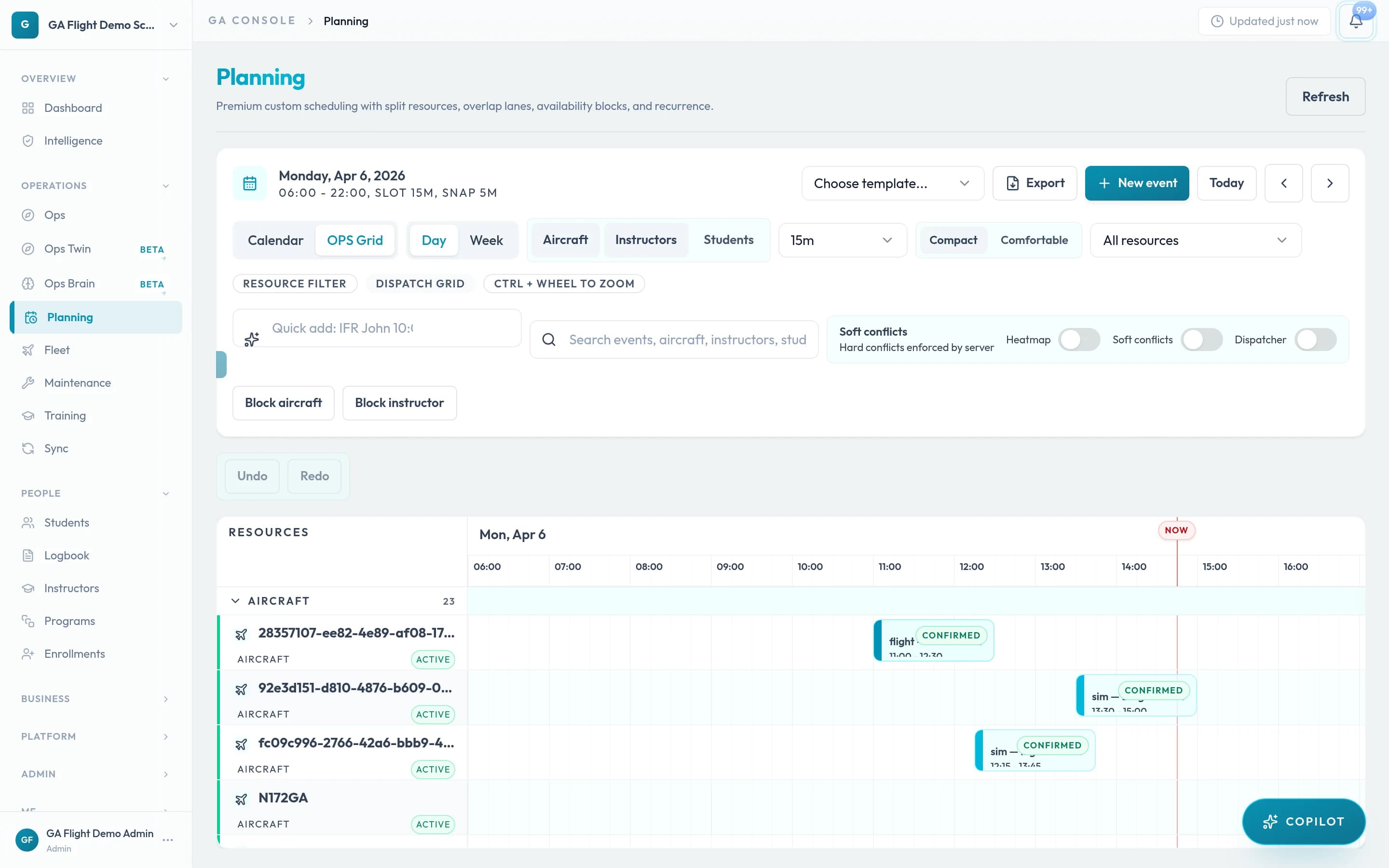
Planning & Dispatch
Sortie board with live status, instructor and aircraft allocation, and block-time coordination.
Production interfaceTraining
Syllabus progression, stage continuity, instructor sign-off, and training evidence linked to each sortie.
Student
A. Morin — PPL(A) Program
Stage 01 — PPL Ground
DoneStage 02 — Basic handling
DoneStage 03 — Nav + cross-country
64%Stage 04 — Night qualification
PendingRecent sorties
Instructor note
Capt. R. Mills — Stage objective met. Approved for solo cross-country qualification attempt.
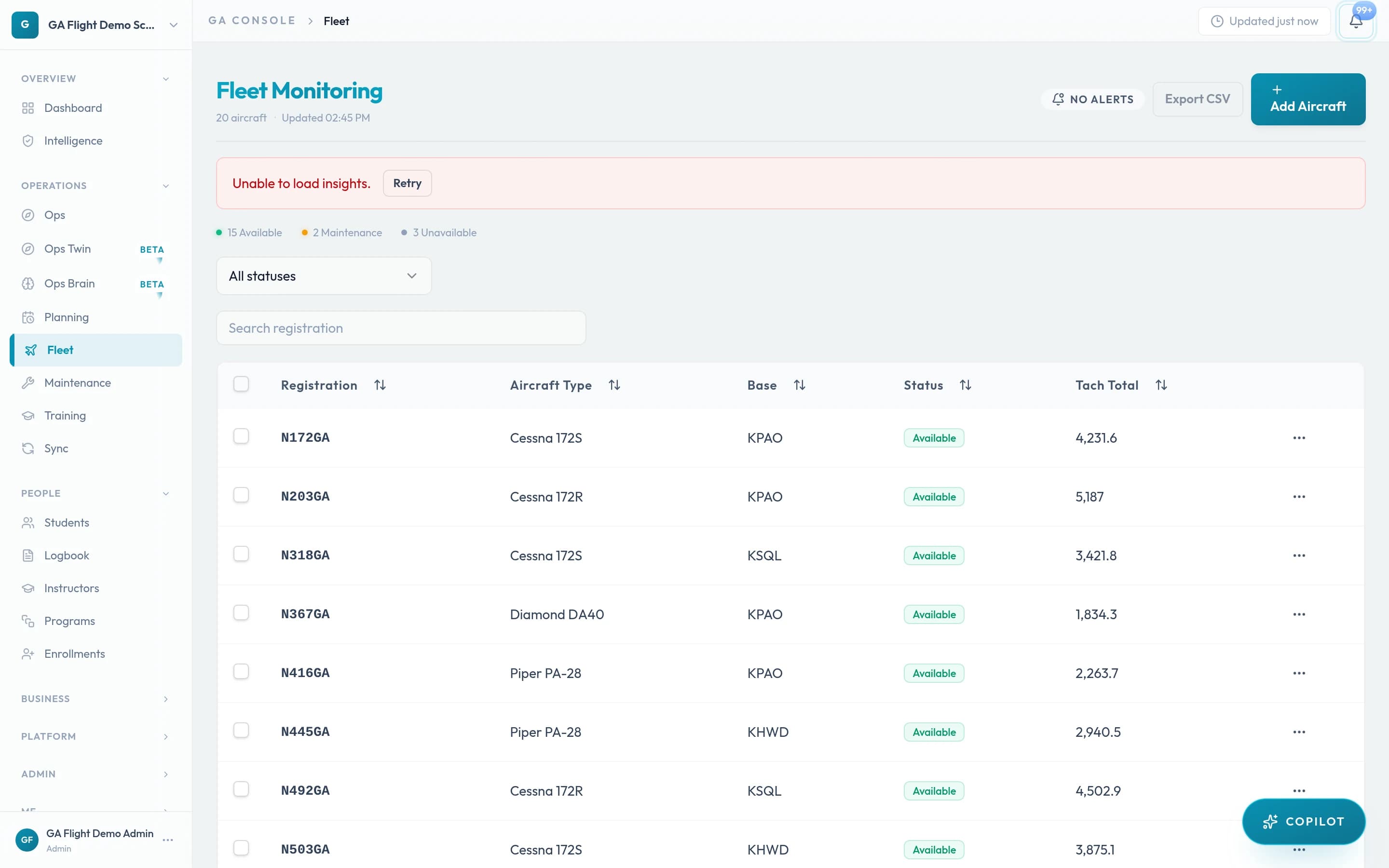
Fleet & Maintenance
Aircraft availability, utilization hours, and maintenance queue driven by actual sortie data.
 Production interface
Finance & Compliance
Billing lines, payment status, and compliance items derived from the same operational thread.
Billing lines — this week
Compliance status
Week revenue
€3,846.00
Pending lines
3 sortie
Compliance items
1 due
Screenshots show the production interface with sample data. Illustrative previews are representative of surfaces in development. Request a live demo to see your operational context.
Fragmentation Replaced
Most flight schools run on a combination of tools that were never designed to work together. GA Flight was built to replace that stack with a single operational architecture.
Spreadsheets
— Planning and dispatch
Manual updates, version conflicts, no live visibility
ForeFlight / SkyDemon
— Pilot navigation
Not connected to school ops, training, or admin systems
LogTen / Zululog
— Personal logbook
Disconnected from school records, must be manually populated
Email + WhatsApp
— Instructor coordination
Ephemeral, unauditable, fragmented by channel
Generic accounting tools
— Billing and invoicing
No link to sortie records, requires manual reconciliation
Paper or PDF forms
— Compliance and authority records
No chain of custody, cannot be linked to operational evidence
GA Flight unifies all of these in one operational architecture with shared data continuity.
Expansion Surfaces
GA Flight keeps its trust model explicit: core operations are production-ready, while emerging intelligence and ecosystem layers are in active development. Beta modules are available for opt-in evaluation and may evolve before general availability.
Organization Entry
Create your organization profile and align planning, flights, training, fleet, maintenance, finance, and compliance in one command structure. No fragmented tools. No re-entry.
Plan Structure
Plans scale with your active training volume. All core modules are available across tiers — advanced modules expand as your operations require them.